 CRM Guard
TCPA calling-hour checks for GoHighLevel
GoHighLevel can call and text your leads at any hour. It doesn't check whether the law lets you contact them right now. CRM Guard adds that check to the GoHighLevel contact page, before the call or text goes out.
What GoHighLevel does on its own
GoHighLevel has three tools that deal with timing or consent. None of them checks state calling-hour laws on a call or text you start yourself.
- A workflow's time window holds its calls, texts and emails until a set time of day, in the account's time zone or the contact's. It's one set of hours for every day of the week, and it only covers workflows. It doesn't know that Florida stops at 8 PM, that Alabama bans Sundays or that Pennsylvania bans holidays.
- The Texas SMS Safeguard is one switch that blocks marketing texts sent by workflows or bulk tools to Texas area codes. Texts you send one at a time still go through, and it ignores the time of day.
- Do Not Disturb stops messages to contacts who opted out. It ignores the time too.
What CRM Guard adds
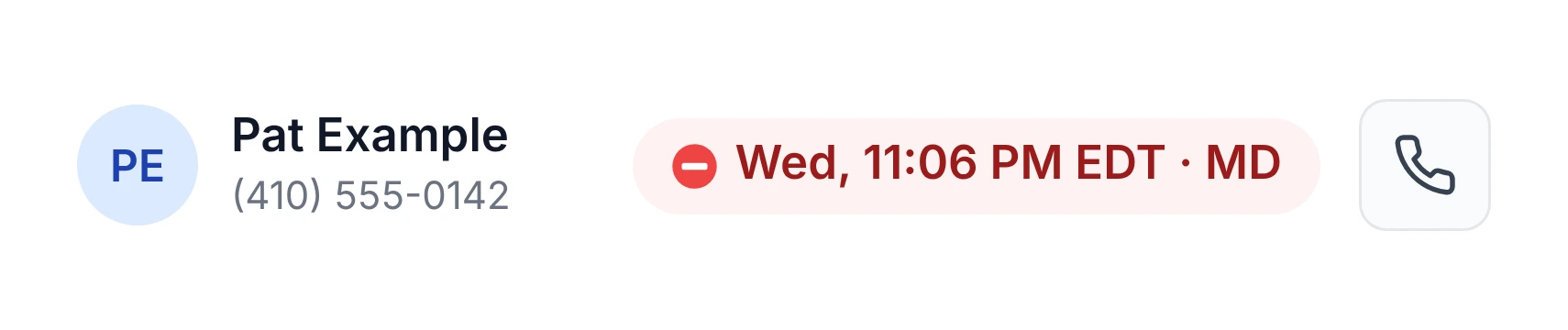
The contact's local time shows next to the call button. It turns red when calling isn't allowed, so you see it before you click.
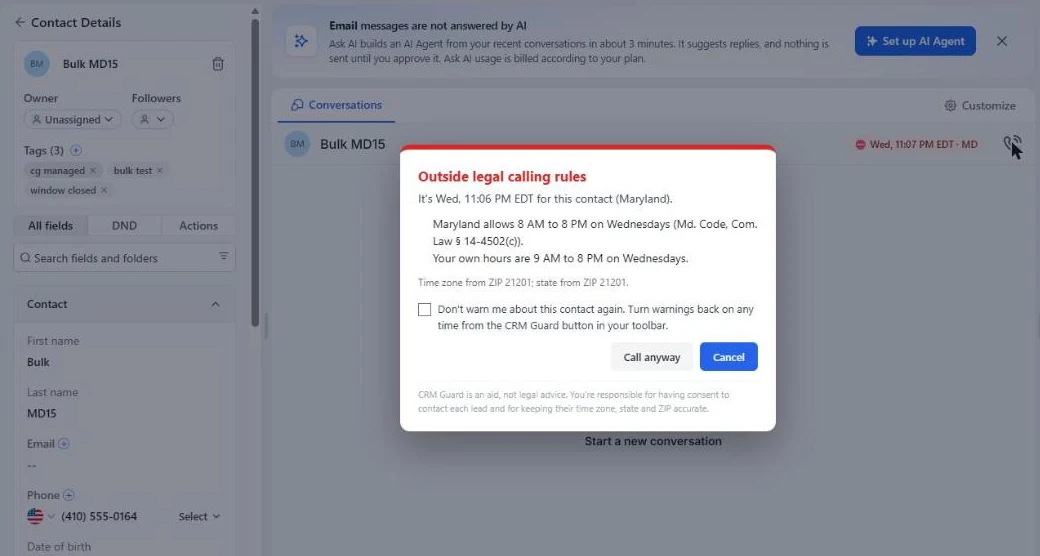
When you click Call, or Send on a text, CRM Guard checks the contact's local time first. If it's outside the rules, it tells you which rule and asks you to choose: Call anyway, or Cancel.
There's nothing to set up in GoHighLevel. CRM Guard reads the state, ZIP code and time zone from the contact record. White-label versions of GoHighLevel work the same way.
It knows the rules GoHighLevel doesn't:
- the federal 8 AM to 9 PM window and the states with stricter hours
- Sunday and holiday bans
- the limit of 3 calls in 24 hours in Florida, Maryland, Oklahoma and Oregon
- declared emergencies in New York and Louisiana
- your own calling hours
It also checks the area code. If the phone number's area code belongs to a different state than the contact's address, CRM Guard checks both states and uses the stricter answer.
What it doesn't do
CRM Guard checks the calls and texts you start by clicking in GoHighLevel. It can't see workflows, bulk sends or dialers that run in the background. It doesn't check consent or Do Not Call lists. It's a compliance aid, not legal advice.
Getting started
- Install CRM Guard from the Chrome Web Store.
- Enter your license key.
- Open any contact in GoHighLevel. The time label appears next to the call button.
Using a different CRM? See which CRMs work with CRM Guard.
Want to see the rules first? Look up any state's calling hours.
Sources for GoHighLevel's own features: HighLevel's help articles on workflow settings, the Texas SMS Safeguard and the LC Phone messaging policy, checked October 2026.