 CRM Call Guard
Catch the out‑of‑hours call before you dial it.
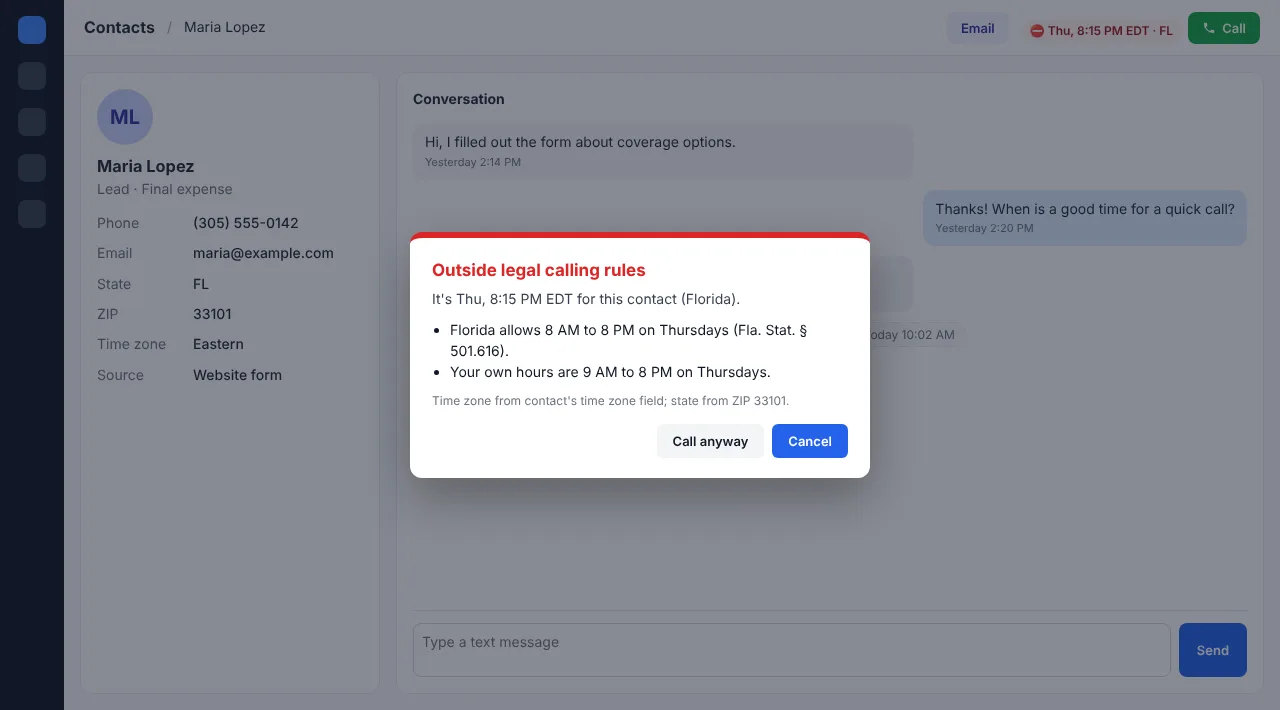
CRM Call Guard checks every contact's local time against federal and state calling rules and your own hours. If a call or text falls outside them, it asks you before anything goes out.
Stricter state hours, Sunday and holiday bans, Pennsylvania's new 7 PM cutoff, Florida's 3-calls-a-day limit: it knows them, so you don't have to look them up mid-dial.
A Chrome extension. Works with GoHighLevel out of the box and with other web-based CRMs after a one-minute setup.
- Loading local times…
How it works
Add it to Chrome
Install the extension and enter your license key.
Point at your buttons
Open a test lead and click your call and text buttons once. GoHighLevel is recognized automatically.
Call like you always do
You'll see each contact's local time next to the call button. Outside the rules, a prompt asks before the call goes through.
What it checks
- Federal hours: 8 AM to 9 PM in the contact's time zone
- Stricter state hours, such as Kentucky's 10 AM start or Florida's 8 PM end
- Sunday bans and state holiday bans, including holidays moved to a Friday or Monday
- 3-per-day limits in Florida, Maryland, Oklahoma and Oregon, counting calls and texts
- Your own earliest and latest call times, on top of the law
- Texts as well as calls
- Upcoming law changes, which switch on by themselves on their start date
- Time zone from the contact's time zone field, then ZIP, then state, then area code
Call Guard doesn't check Do Not Call lists or consent. You remain responsible for those.
Simple pricing
$24/month
$24 covers 2 users. Each extra user is $10.
Secure checkout by Paddle, our payment provider. Coupon codes can be entered at checkout.
Every plan includes
- All federal and state rules, updated as laws change
- Calls and texts, on every CRM you set up
- Your own calling hours
- Add or remove users anytime
Fine print, in plain words
- Monthly: cancel anytime; it stays on until the end of the month you paid for.
- Yearly: full refund if you ask within 14 days.
- 50 or more users? Email us for a quote.
Questions
Which CRMs does it work with?
GoHighLevel, including white-label versions, works automatically. Other web-based CRMs work after a one-minute setup where you click your call button, text button and the contact's fields once. Separate dialer buttons on the page can be added too.
Does it block calls?
No. It asks first. Every prompt has "Cancel" and "Call anyway", because you may have a reason the rules allow, such as an existing customer or prior consent.
Does my contact data leave my computer?
No. Call Guard reads the contact's time zone, state, ZIP and phone on the page to work out their local time, and nothing about your contacts is sent to us or anyone else. The only thing it sends is your license key, to confirm your subscription.
How does it know the contact's local time?
It trusts the contact's time zone field first, then the ZIP code, then the state (using the most cautious time zone for states with two), and the area code only as a last resort, since people move. Keep the time zone field accurate and Call Guard will be too.
How do users work?
One license key covers the number of users you pay for. Each person enters the same key. You can add users, or sign someone out, from your account page.
Is this legal advice?
No. Call Guard is an aid for calling-hour rules. It doesn't check consent or Do Not Call lists, and state laws have exemptions it can't know about. Check your situation with an attorney.